


CRM & Marketing Automation
Lead capture, email and SMS follow-up, reminders and pipeline automation, so every enquiry gets a response and nothing depends on memory.
- Fixed price, agreed scope
- Reply within 2 working days
- One point of contact
- GoHighLevel
- SMS
- Webhooks
- Zapier / Make
- Calendars
Sound familiar?
These are the issues I see most often before a CRM Automation project starts. Each one quietly costs enquiries, time or trust, and most businesses have more than one.
Usually a good fit if you're
- Businesses where follow-up depends on someone remembering
- Teams with no-shows that reminders could reduce
- Owners who suspect their current automations are leaking leads
- 01
New leads wait hours, or days, for a reply.
- 02
Booked clients forget appointments.
- 03
Old leads go quiet and are never contacted again.
- 04
Nobody knows which automations are running.
How I solve it with CRM Automation.
Most lost leads are not lost to competitors. They are lost to slow or forgotten follow-up. Marketing automation makes the first response instant and the next five consistent.
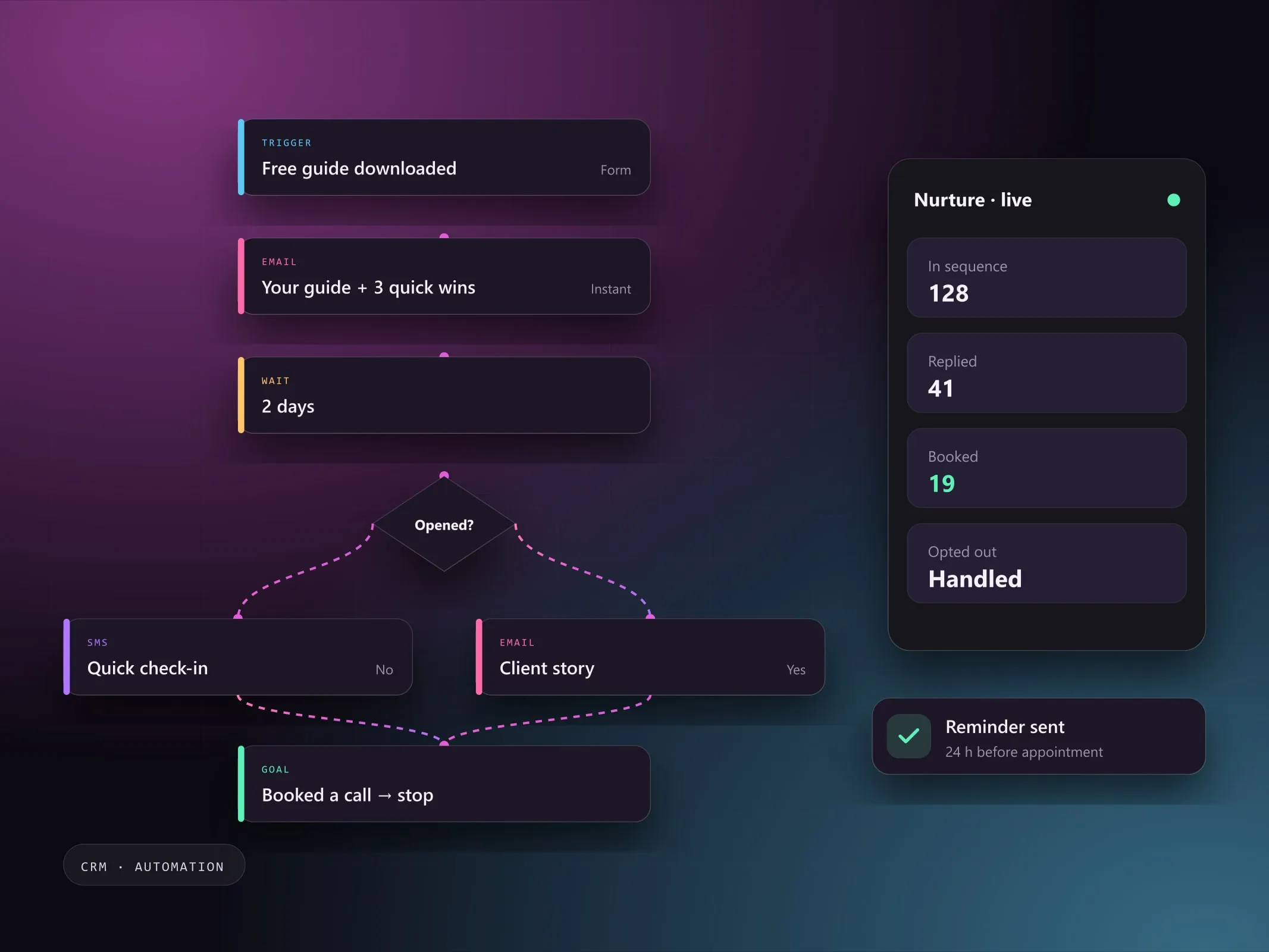
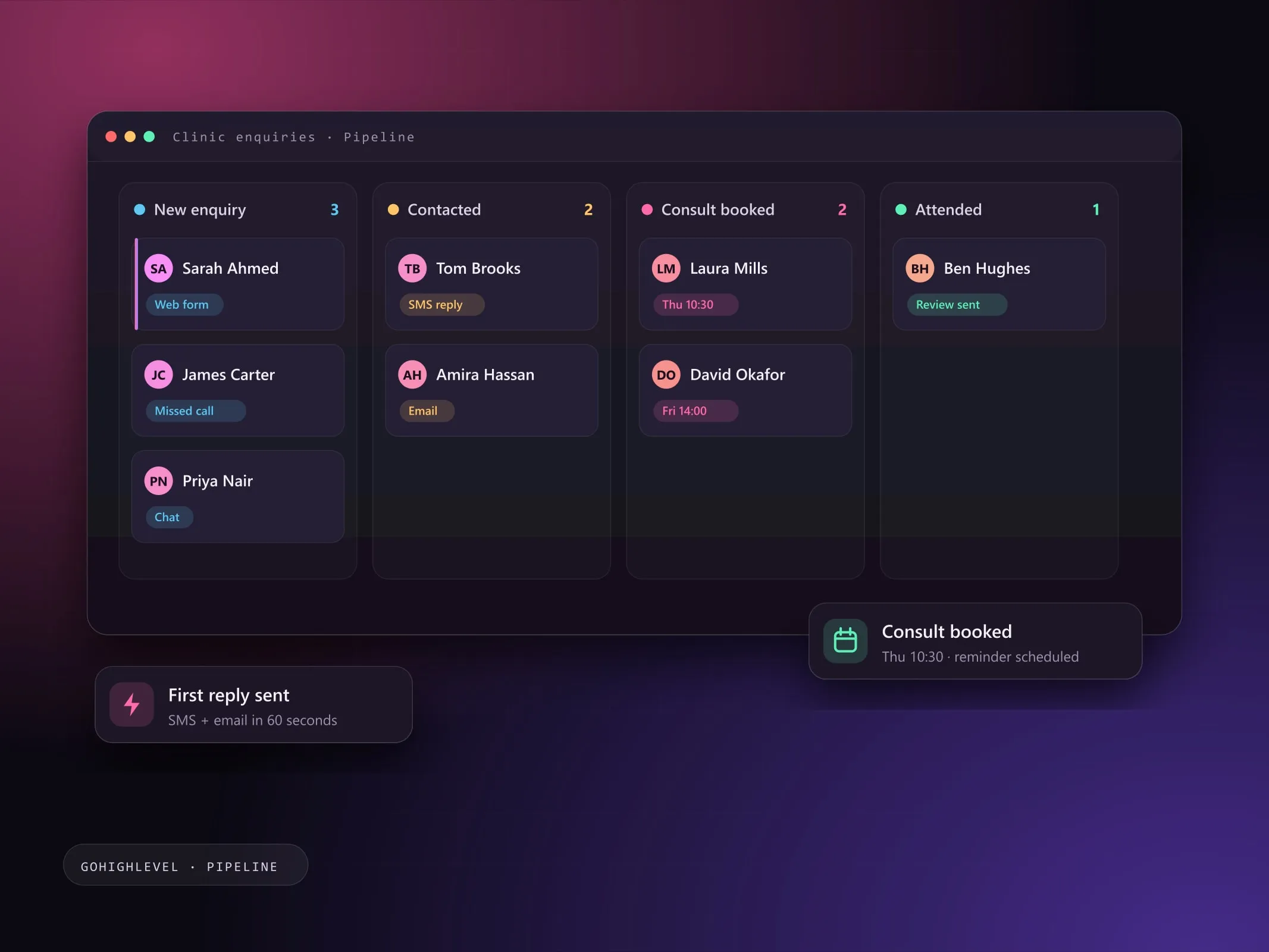
I build the systems behind that: capture points that tag and route leads, email and SMS sequences, appointment reminders, and pipeline updates that happen on their own.
- 01
Problem: New leads wait hours, or days, for a reply.
Solution: An instant first response by SMS and email, then a booking link.
- 02
Problem: Booked clients forget appointments.
Solution: Reminders before every appointment, and a no-show follow-up.
- 03
Problem: Old leads go quiet and are never contacted again.
Solution: Re-engagement messages for contacts who have gone silent.
- 04
Problem: Nobody knows which automations are running.
Solution: An audit and a written map of every workflow and what it does.
Everything in a CRM Automation build.
Scope is agreed in writing first. You pick what you need and only pay for that.
Plan my project- Lead capture systems
- Email and SMS workflows
- Customer journeys
- Appointment reminders
- Lead follow-up sequences
- Pipeline automation
- Third-party integrations
- Automation audits and optimization
4 clear steps, no surprises.
- 01
Audit
Where leads come from, where they stall, and what currently happens next.
- 02
Design the journey
Messages, timing and stop conditions for each stage.
- 03
Build and connect
Workflows, templates, integrations and pipeline rules.
- 04
Measure
Check delivery, replies and bookings, then adjust the sequence.
Pick the engagement that fits.
Each option is quoted at a fixed price for the agreed scope, with no hourly surprises.
Follow-up system
Capture, first response and nurture sequences built from scratch.
Discuss this optionAutomation audit
A review of existing workflows with a prioritised fix list.
Discuss this optionOngoing optimisation
Monthly checks on delivery, replies and bookings, with adjustments.
Discuss this optionWhat you get at handover
- Lead capture with source tagging
- Email and SMS sequences with stop conditions
- Appointment reminder and no-show workflows
- Pipeline automation rules
- Workflow map and handover notes
Good to know
- Email and SMS sending must follow consent and anti-spam rules in your market; we build opt-out handling in from the start.
- SMS may require carrier registration (such as A2P 10DLC in the US).
CRM Automation questions, answered.
Can't see yours? I'm happy to answer anything before you commit.
Ask a question Which CRM do you work with?
Mainly GoHighLevel. I can also connect other tools through native integrations, webhooks or automation platforms.
Can you audit what I already have?
Yes. An automation audit lists what each workflow does, where it overlaps or fails, and a prioritised fix list.
How do you stop automations from spamming people?
Every sequence has stop conditions: a reply, a booking or an opt-out removes the contact. Opt-out handling is built in on every SMS and email.